How to Join the Online Class Sessions from SimpliTrain
As a learner, you can easily access your current virtual class sessions in SimpliTrain by following these steps:
Steps to Access Your Current Class Session
- Go to “My Training” Section
- Select “My Training” from the top navigation.

- This will open the My Training page.
2. Open the Classes Tab
- On the My Training page, select “Class Enrollments” from the Categories list.
- Click on the “Classes” tab to view all your enrolled classes.
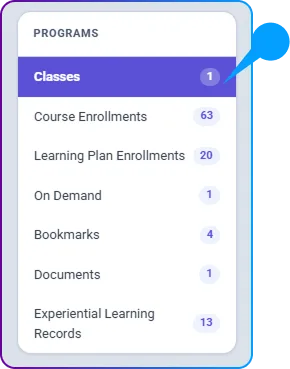
3. Select Your Class
- Find the class you wish to attend from the list of enrolled classes.
- Click on the class name to be redirected to the Class Enrollment page.
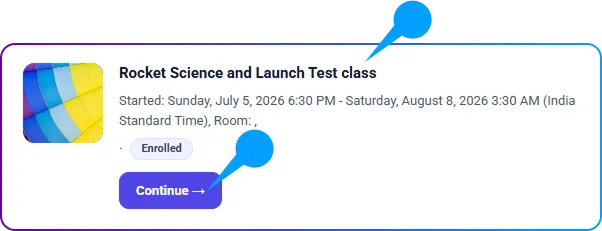
4. Review Class Details
- On the Class Enrollment page, you will see essential information about your class, including:
- Summary
- Activities
- Instructor Feedback
- Notes
- Software Check

5. Complete Software Checks
- In the Software Check section, ensure that all necessary system requirements are met before entering the virtual classroom.
- Perform any required checks and accept agreements as needed.
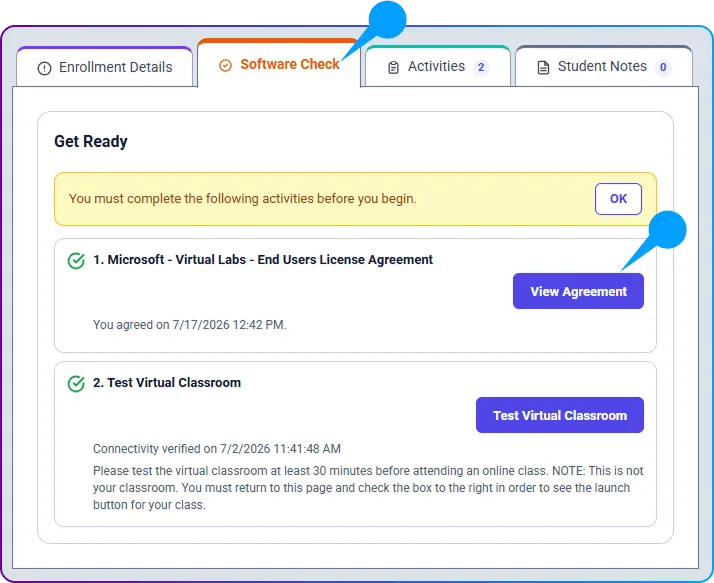
6. Enter the Virtual Classroom
- Once all software checks and agreements are completed, the “Enter Virtual Classroom” button will become active.
- Click on it to join your class session.